The short version
- An AI support agent is four parts: a model, tools, context, and guardrails. Most of the engineering lives in the last three — the model is the part you rent.
- Build it beside your product, not on top of it: answer from knowledge a person curates plus the user's real records, mirror conversations to the channel your team already reads, and make human takeover a hard short-circuit, not a suggestion.
- The case study: a support agent on a live events platform that answers from an FAQ index and the page the user is on, hands threads to a human in Slack on one command, and never waits on any of that to reply.
Every product that grows past a few hundred users develops the same support problem: the same twenty questions arrive every week, a person answers them by hand, and the genuinely hard cases wait in the same queue as "how do I change my event date?" An AI support agent is the obvious fix — and also the easiest thing to build badly, because a demo that answers questions is a weekend project, while an agent you can trust in front of paying customers is not.
This guide covers the whole path: what a support agent actually is, how to decide whether you need one, how to architect it, and then — because generic advice is cheap — exactly how I implemented one on a real production events platform, with the trade-offs that came up and what I would copy or avoid next time.
What an AI support agent actually is
Strip away the marketing and an AI support agent is a loop: a user message comes in, the system assembles context (what page the user is on, what your docs say, what their account shows), a language model writes a reply inside rules you set, and something records the exchange so humans can supervise. That is it. The intelligence people perceive is mostly the quality of the context you assemble, not the model.
The four parts of every AI agent
The model
writes and reasons
A hosted or self-hosted LLM that turns context into text. It is the least controllable part, so everything else exists to narrow what it can get wrong.
Tools
act on the world
APIs, database reads, search. Each tool is a permission. The agent's real capability list is the tool list, not the prompt.
Context & memory
what it knows right now
Retrieved documents, the current page or record, recent conversation turns. If a fact is not here, the model will guess it.
Guardrails
limit the blast radius
Input validation, scopes, confirmation gates, fallbacks, logging. The unglamorous half that decides whether the agent survives production.
The anatomy matters because it tells you where to spend effort. Teams that struggle usually over-invest in the model box — prompt tinkering, model shopping — and under-invest in the other three: what the agent is allowed to know, what it is allowed to do, and what happens when it fails.
When you should build one — and when not yet
Build one when three things are true. First, you have repetitive questions with stable answers: that is the half an agent automates well. Second, you have somewhere authoritative for answers to come from, or you are willing to create it — a curated FAQ beats a dump of your wiki. Third, someone on your team will own the agent's answers the way they own code: reading transcripts, fixing wrong answers, deleting stale knowledge.
Hold off if your product changes so fast that any written answer is wrong in a week, or if most support contact is account-specific work a bot must not do (refunds it cannot issue, disputes it cannot judge). You can still automate triage in those cases, but the design is different — more routing, less answering.
How you should implement it
Step 1: Make the agent a guest in your product, not a second product
The single most consequential decision is where truth lives. Your product already has the real records — accounts, orders, settings. The agent should read those at answer time, never keep its own copy. The moment the agent has a private database of "what it believes about customers," you have two sources of truth and the wrong one talks to users.
Concretely: the agent is an endpoint in your existing backend, calling the same functions your app calls, with the same permissions model. Not a separate service with a synced snapshot.
Step 2: Separate knowledge from records
Support answers draw on two different kinds of truth, and conflating them is the root of most chatbot embarrassments:
- Knowledge — product rules that hold for everyone: how publishing works, what your cancellation policy is. This belongs in a curated, retrievable store (see the RAG guide) that a person edits.
- Records — facts about this user right now: what they bought, what flag is set on their order. These must be read from the database at request time, in code, on the paths that need them — and only those paths.
Design the split before you write a prompt. Ask of every question type: does answering this require knowledge, records, or both? Questions that require records need stricter handling, which usually means a specialist path — the full argument is in single agent vs multi-agent.
Step 3: Design the human handoff first, not last
The handoff is not a feature you bolt on when the bot fails; it is the safety property that makes shipping the bot acceptable. Three rules:
- Takeover is a short-circuit. Once a human joins a conversation, the model must be structurally unable to reply — checked before any model call, not requested in a prompt.
- Supervision happens where your team already lives. Mirror every bot conversation into Slack, your helpdesk, wherever eyes already are. A supervision tool nobody opens is no supervision.
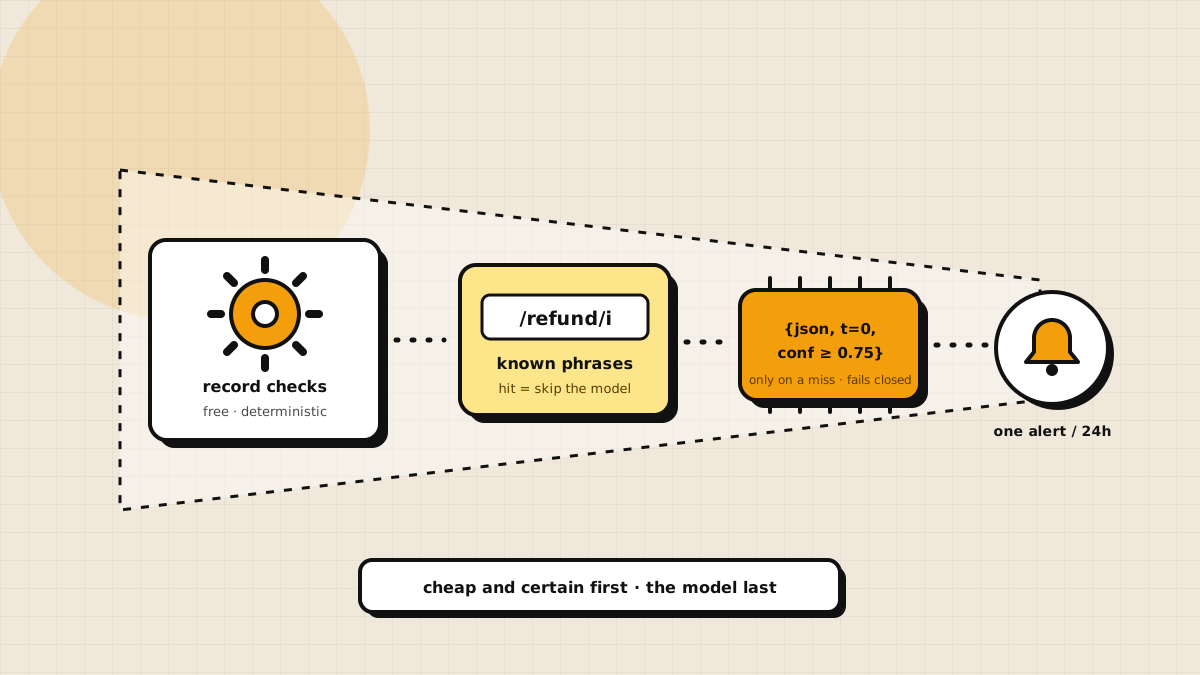
- "Talk to a human" must be debounced. An anxious user tapping the button five times should produce one alert, not five.
Step 4: Keep everything non-essential off the critical path
The user is owed exactly one thing: a reply. Logging, mirroring, analytics, alerting — all of it happens after the reply is produced, and a failure in any of it must not fail the reply. Equally: retrieval is allowed to fail. If your vector store is down, answer from what you have, with the rules that prevent invention. Silence is a worse failure than caution.
Step 5: Write the failure text yourself
For every path where the model call can fail — and it will — author the fallback paragraph by hand: what the user should do, with the real link. A hosted-model outage should degrade your bot into a well-written static help page, not an error toast. Provider strategy beyond that is its own decision; I cover it in open-source LLM vs OpenAI API.
How I implemented it on a real project
The rest of this article is the concrete version: a support agent I built into a production events platform — a product where people host events, sell tickets, and message organizers. The product had already shipped; support was a person in Slack plus a pile of answers we kept repeating. Everything above came from building this.
The shape of one request
The agent is one callable function in the existing backend. It does not require sign-in — a logged-out visitor can ask how refunds work; they just cannot get a verdict about their ticket until they sign in. Here is the path every message takes:
The path one message takes
- 1One callableSigned in or not, the question arrives at the same function. Empty questions are rejected before anything else runs.
- 2Takeover checkshort-circuitIf a person already joined this conversation, the model is skipped entirely. The message is relayed into the existing Slack thread and the turn ends.
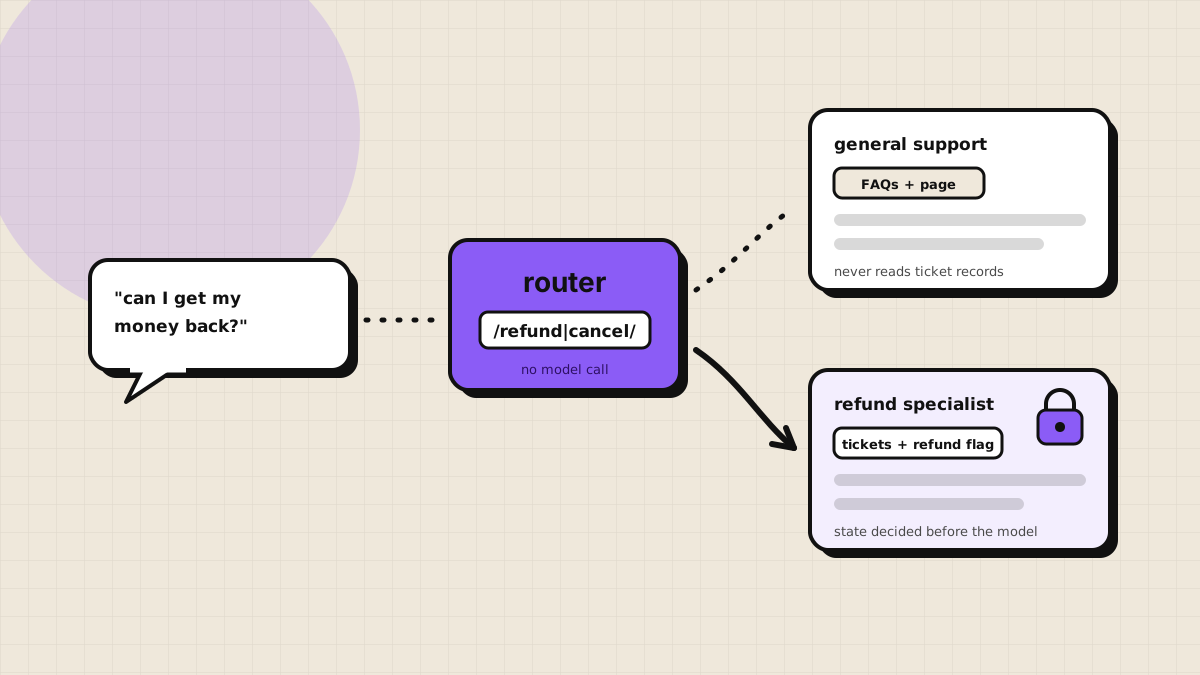
- 3Rules routerRegex plus recent history picks the general agent or the refund specialist. No model call is spent on routing.
- 4The chosen agent answersGeneral: FAQ retrieval, one completion. Refund: account state first, then a prompt that already knows the facts.
- 5Mirror to Slacknot on the critical pathQuestion, answer, page, and every FAQ hit with its id and score land in a thread. A failure here never fails the reply.
Two details in that flow carry most of the safety:
The takeover check runs before the model. Each conversation stores a takeover flag. When a teammate types reply in the mirrored Slack thread, the flag is set, and from then on the user's messages are relayed to that thread — the model never sees them. exit hands the conversation back. The commands are parsed from Slack; the model has no say in when it is allowed to speak. And if the flag lookup itself fails, the code falls through and answers anyway, because a broken read should not trap someone in a silent chat.
Slack is a mirror, not a dependency. The question, the answer, the page the user was on, and every retrieved FAQ with its id and score are posted into a thread — after the user already has their reply, wrapped so a Slack failure changes nothing. The FAQ ids in the thread are the same ids a teammate can edit, which turns every wrong answer into a one-command fix.
What the agent is allowed to know
The general-support path assembles three context blocks: the system rules (answer from the provided material, never invent a policy, price, deadline, link, or feature; point to the support address when the answer is missing), the page context (signed-in state, role, event name, dates, spots left — pasted in as data, not recalled from memory), and the top FAQ matches from a vector index that contains only curated question-answer pairs.
Questions about money and tickets leave this path entirely. A rules-based router sends them to a specialist that reads the user's actual tickets and the event's actual refund flag before composing a word — that design is its own guide, because it is where generic chatbots invent things.
Asking for a person
A second callable marks the conversation for human attention and pings the Slack thread with the page the user was on. The guards: if a human is already in the thread, it returns silently; a repeat request within five minutes returns "already requested" instead of a second ping; cancel clears the flag with a one-line note. Small rules, but they are the difference between a handoff your team trusts and a notification channel they mute.
What I deliberately did not build
No agent framework graph, no fine-tuned model, no self-hosted LLM, no autonomous tool loop. The model's only job is writing replies inside assembled context. Routing is regular expressions. Record reads are ordinary queries. Each of those could be upgraded to something fancier, and each upgrade would have added a failure mode before it added a capability. Start boring; escalate when a real miss tells you to.
Pitfalls to avoid
- Letting the bot keep its own customer data. Read the product's records at request time. Always.
- Shipping the handoff "in v2." The handoff is the license to ship v1.
- Making the reply wait on logging or analytics. Mirror after, swallow mirror failures.
- Treating the prompt as the security boundary. "Do not reveal X" is a wish. Not providing X is a control.
- No owner for the knowledge base. An unowned FAQ index rots, and the bot repeats the rot with confidence.
FAQ
It matters less than the context you assemble. Pick a fast hosted model behind one adapter function so you can swap providers later. The knowledge store and guardrails outlive any model choice.

Written by
Rushit Jivani
Senior Software Architect & AI Application Engineer. Architecture that shows up in crash rate, performance and how fast the team ships.